
See how simple procurement can be

Procure-to-Pay Automation
Procure-to-pay process automation, stage by stage: what to automate, in what order and how to check every invoice against the deal you negotiated.
Key Takeaways:
- P2P automation handles POs, invoice matching, exceptions and payments, so people only manage policy and exceptions.
- Most P2P tools check invoices against the PO, not the negotiated contract.
- Indirect spend is hardest to control, because it's often bought without a PO and its contracts change mid-term.
- Automate upstream first: capture the agreed terms, then raise POs from the contract.
- Vertice checks every invoice against the PO, the negotiated terms and the market rate behind them.
Procure-to-pay (P2P) automation uses software to handle the manual steps in the procure-to-pay process: routing approvals, raising purchase orders, matching invoices and releasing payments. People set the policy and handle the exceptions, and the system does the rest.
Traditional P2P was built for direct spend: planned orders from known suppliers, for goods you can physically count on arrival. Indirect spend, such as software and services, works differently. Employees often have the autonomy to buy it, pricing is set by seat count, usage or both, and the cost, term and renewal uplifts are defined by a contract.
This contract is where the problem starts. It typically sits in a repository, a sourcing tool or someone’s inbox, rather than in the system that processes the invoice. When the invoice arrives, AP checks it against the PO, if there is one, and pays. Until now, there’s been no easy way to check it against the deal that was negotiated. So an invoice billed at list price, rather than the negotiated rate, can clear unchallenged.
Procure-to-Pay automation vs accounts payable (AP) automation vs procurement automation
These terms are often used interchangeably, but each covers a different part of the purchasing process, and each checks the invoice against something different.
AP automation is the most common starting point, because invoice volume is where manual effort is easiest to see. But it only sees the invoice. P2P automation connects the invoice to the order that authorized it. Intake-to-Pay goes a step further, with the request, negotiation and contract running through the same platform as the invoice, so the invoice is checked against the terms that were agreed. That’s the gap Vertice’s Procure-to-Pay is built to close.
Where manual P2P breaks down
Manual P2P rarely fails dramatically. It fails through small gaps between the people who agree a purchase and those who pay for it.
Slow intake leads employees to bypass procurement
Before the P2P process begins, a purchase has to clear intake, negotiation and approvals. Vertice’s data shows that intake averages 10.3 days and negotiation 11.8 days, while legal approval stretches to 14 days for the slowest 20% of requests.
When the front door is that slow, employees simply find another route. Some use a card, bypassing P2P entirely. Others use the vendor’s order form without raising a PO, and the invoice then reaches accounts payable with nothing to match against.
Finance finds out when the invoice arrives
A department lead can commit the business to a significant contract without finance knowing until the bill lands. By then, the budget is already spent and there’s no chance to question the purchase.
Mid-contract price changes go unchecked
Even when the first invoice matches the negotiated rate, software contracts don’t always remain fixed. Seats get added mid-term, usage tiers shift and renewal uplifts kick in, and each change should be reflected in what’s invoiced. Without the contract terms on record, AP has no way of telling an agreed increase from an overcharge.
Occasional users make the coding errors
The wrong general ledger (GL) code or cost center rarely comes from the finance team. It comes from someone who raises a purchase request once or twice a year and never learns the system. The error surfaces weeks later in financial reporting, with no trail back to its source.
Non-PO invoices rely on memory
Without a PO, an invoice is approved by whoever remembers the purchase. That confirms the spend was expected. It doesn’t confirm the price, quantity or term match what was agreed.Automation closes these gaps.
What to automate at each stage of the procure-to-pay process
Procure-to-pay process automation works stage by stage. Each stage of P2P has a manual version and an automated one. The table below shows what changes at each stage and what the automated step checks against.
How to automate your P2P process, step by step
Automating P2P is less about switching everything on at once than about getting the order right. Each step depends on the one before it.
1. Baseline your current process
Before changing anything, measure where you currently stand: cycle time from request to payment, the share of spend backed by a PO, how many invoices needed manual intervention and the average cost of processing one. Without a baseline, you can’t show what automation delivered. Vertice’s procurement maturity assessment benchmarks your process in minutes.
2. Capture the contract terms at the point of commitment
Everything downstream depends on knowing what was agreed. Route purchase requests through a single intake process, so the vendor, price, quantity and terms are recorded when the commitment is made, not reconstructed when the invoice arrives. Seamless intake also removes the reason employees work around it and therefore reduces maverick spend.
3. Raise POs from the contract
Generate the PO directly from the approved request and signed contract, rather than rekeying it. The PO then carries the negotiated rate and correct coding, and every later check runs against the real terms.
4. Decide how non-PO spend is handled
Some invoices will always arrive without a PO. Set a policy for them: route them to a budget holder by default, or enforce a no-PO-no-pay rule above a set threshold. Either way, the decision should be made by a policy, not by whoever happens to remember the purchase.
5. Automate invoice capture and coding
Capture invoices from email, vendor portals and uploads, and extract and code them against your own account codes. This removes the manual data entry, and with it most coding errors.
6. Match invoices and route exceptions
Set matching tolerances, so invoices that agree with the PO and contract clear without anyone touching them. Route anything outside tolerance to a named owner with the context to resolve it, instead of leaving it in a shared AP queue.
7. Measure against your baseline
Track the same metrics you captured in step one. If exceptions remain high, the problem is usually upstream: in intake or in POs raised without the contract terms.
Measuring the impact of P2P automation
Four metrics show whether procure-to-pay automation is working:
- Touchless invoice rate: The share of invoices processed with no manual intervention.
- First-time match rate: The share of invoices that clear matching on the first pass.
- PO coverage: The share of spend backed by an approved PO.
- Cycle time: The time from approved request to payment.
These metrics all measure efficiency, but efficiency has a floor. Once most invoices clear automatically, cost per invoice can’t fall much further. The bigger question is around whether you paid the right price – Vertice’s data, drawn from $75 Billion in processed indirect spend, shows that organizations can secure an average discount of 34% off list price on software.
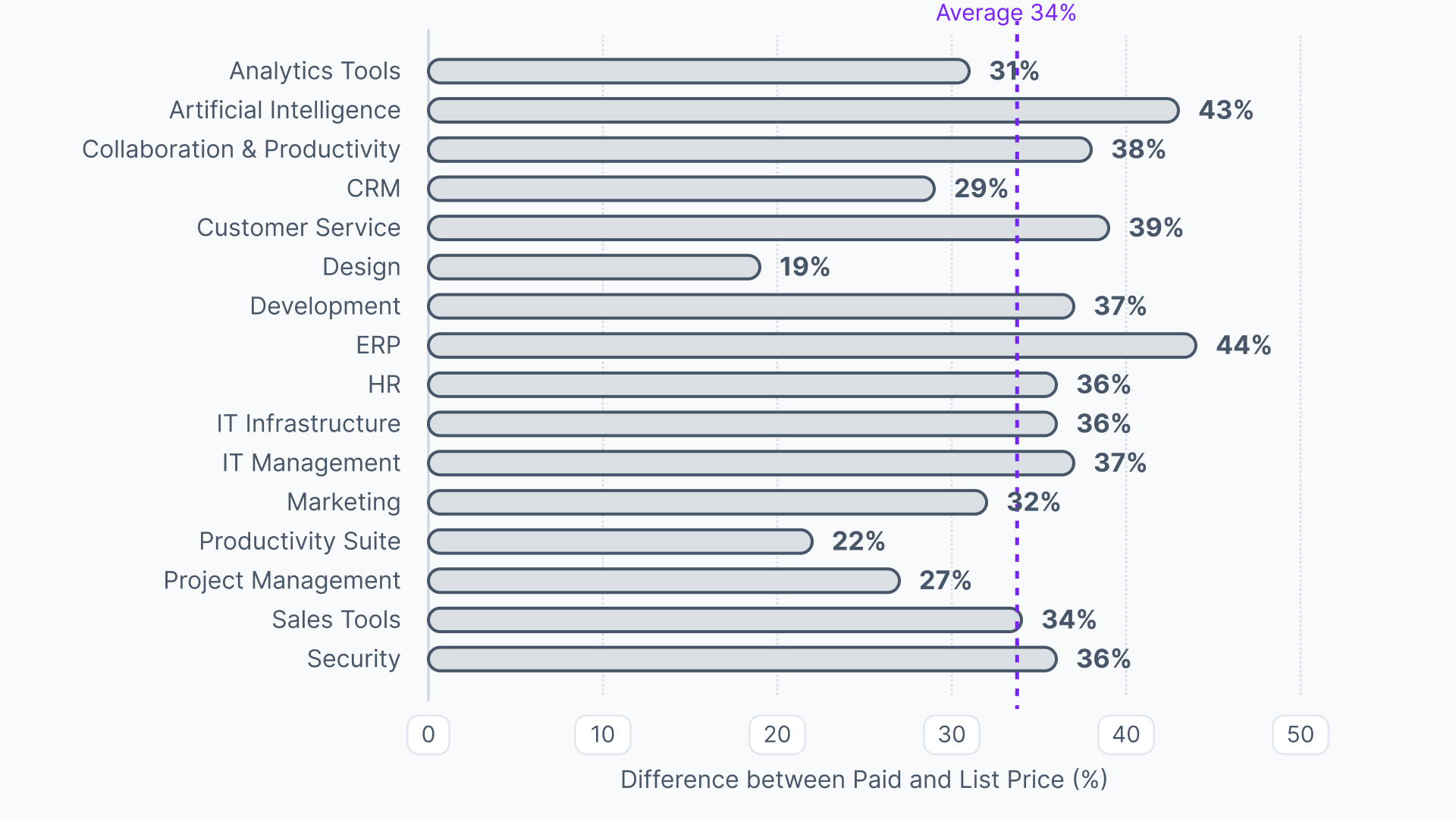
That saving will, however, only hold if the invoice is checked against the contract that secured it.
Choosing P2P automation software
When researching procure-to-pay software solutions, your first decision is whether you want an end-to-end procurement suite or a point solution:
- An end-to-end suite covers every stage of P2P in one platform.
- Point solutions each automate one stage, such as invoice capture or payments, and are integrated together.
Point solutions mean more handoffs, with each handoff a place where data can fall out of sync. The contract terms are the first thing to go missing between the tool that negotiated them and the tool that checks the invoice.
This is why more finance and procurement teams are consolidating onto a single platform for the whole purchasing process, from intake to payment.
Whichever you opt for, ensure you’re asking the following questions:
- Does it check invoices against the negotiated terms, or only the PO? PO matching confirms the invoice is consistent with the order, not that the price was right. Ask where the contract terms come from. If someone uploads the signed contract after the fact, the tool knows what was signed but not what was negotiated: the rate secured, the discount off list or how that price compares with what similar companies pay. The strongest platforms hold the negotiation itself, so every invoice is checked against the deal and the market rate behind it.
- How does it handle invoices without a PO? Look for policy-based routing, not a shared queue.
- Does it integrate both ways with your ERP? One-way exports leave finance reconciling manually.
- Will occasional users get it right? Most coding errors come from people who raise a request once or twice a year, so guided entry matters more than advanced features.
- Is the budget visible at the point of approval? Approvers should see the impact before they sign off, not at month end.
The missing check in procure-to-pay automation
Most P2P automation speeds up the same process: capture the invoice, match it to the PO, pay. That saves time, but it leaves the most expensive question unanswered: is the price on the invoice the price you negotiated?
Vertice can answer it because it's involved in the deal from the start. Requests come in through intake. Contracts are negotiated with benchmarks from 250,000 contracts, 32,000 vendors and $75bn of spend, and POs are raised from the agreed terms. When the invoice arrives, it's checked against the PO and the contract on the same record. Anything that doesn't match is flagged before payment, not discovered at month end.
That turns P2P from a process judged on what it costs to run into one judged on what it protects.
See Vertice in action by taking a self-guided tour of the platform.
Procure-to-Pay Automation
FAQs
P2P automation uses software to handle the manual steps between an approved purchase and payment: raising POs, capturing and coding invoices, matching them, routing exceptions and scheduling payment. People set the policy and resolve exceptions, and the system handles the routine work.
Yes. Vertice's procure-to-pay extends its intake-to-procure platform, covering the full process from purchase request to approved invoice. POs are raised from the negotiated contract, invoices are captured, coded and matched against the PO and contract, and approved invoices push to your ERP.
AP tools check an invoice against the PO, or against a contract someone uploaded. Vertice holds the negotiation that produced the contract, benchmarked against 250,000 contracts and $75bn of spend. Every invoice is checked against the agreed terms and the market rate behind them, not just the order.
Start by measuring your current process, then capture the agreed terms at the point of commitment. From there, raise POs from the contract, set a policy for non-PO invoices, automate invoice capture and coding, and match invoices against the PO and contract. Finally, measure the results against your baseline.
AP automation starts when the invoice arrives and covers capture, approval and payment. P2P automation also covers raising the PO, so the invoice can be checked against the order that authorized it. Intake-to-pay goes further and checks the invoice against the negotiated contract.
Start upstream. If the agreed terms aren't captured when a purchase is committed, every later check is working without them. Automating invoice capture first speeds up AP, but it won't catch invoices that don't match the deal.
Yes. Non-PO invoices can be routed to the right budget holder by policy, or blocked above a threshold with a no-PO-no-pay rule. Without a PO, though, the check depends on the approver. Raising POs from the contract closes that gap.
At minimum, the purchase order, plus a goods receipt where relevant. For software and services, the contract matters most, since it sets the price, term, seat count and any renewal uplifts that the invoice should reflect.
.webp)